
If you have ever sat through a 90-minute lecture with a laptop open, slides on one side, and a half-caught sentence still hanging in your head, you already know the core problem is not typing fast enough. The problem is keeping up, finding the important parts later, and turning class noise into something you can actually study from.
That is where a lecture note taking app earns its place. The good ones do not just record speech. They help you capture, sort, search, and review lecture material without replaying the whole class every time you need one detail. In a 2024 study of note-taking in higher education, 94% of respondents said they took notes in lectures, and 69% of those note-takers used digital methods rather than handwriting (Cogent Education, 2024). Students are already comfortable with screens and searchable text. The question is which tool respects that.
Studying from recorded lectures or YouTube instead of live classes? Claras turns any video into a transcript, an AI summary with clickable chapters, and a chat you can ask anything. Try it free.
What this guide covers
- What a lecture note taking app actually does
- The three layers every app should cover
- Which features to prioritize, and which to ignore
- Workflows that turn an app into a study system
- Accessibility, privacy, and compatibility checklist
- Why more transcript text is not always better
- A first-week setup plan and FAQs
What a Lecture Note Taking App Does
A student in a packed lecture hall hears a professor define a concept, glances down to catch a formula on the slide, and realizes three lines of notes already missed the point. That moment usually does not mean they need a faster recorder. They need a workflow layer that turns one long block of speech into something searchable, skimmable, and worth revisiting.
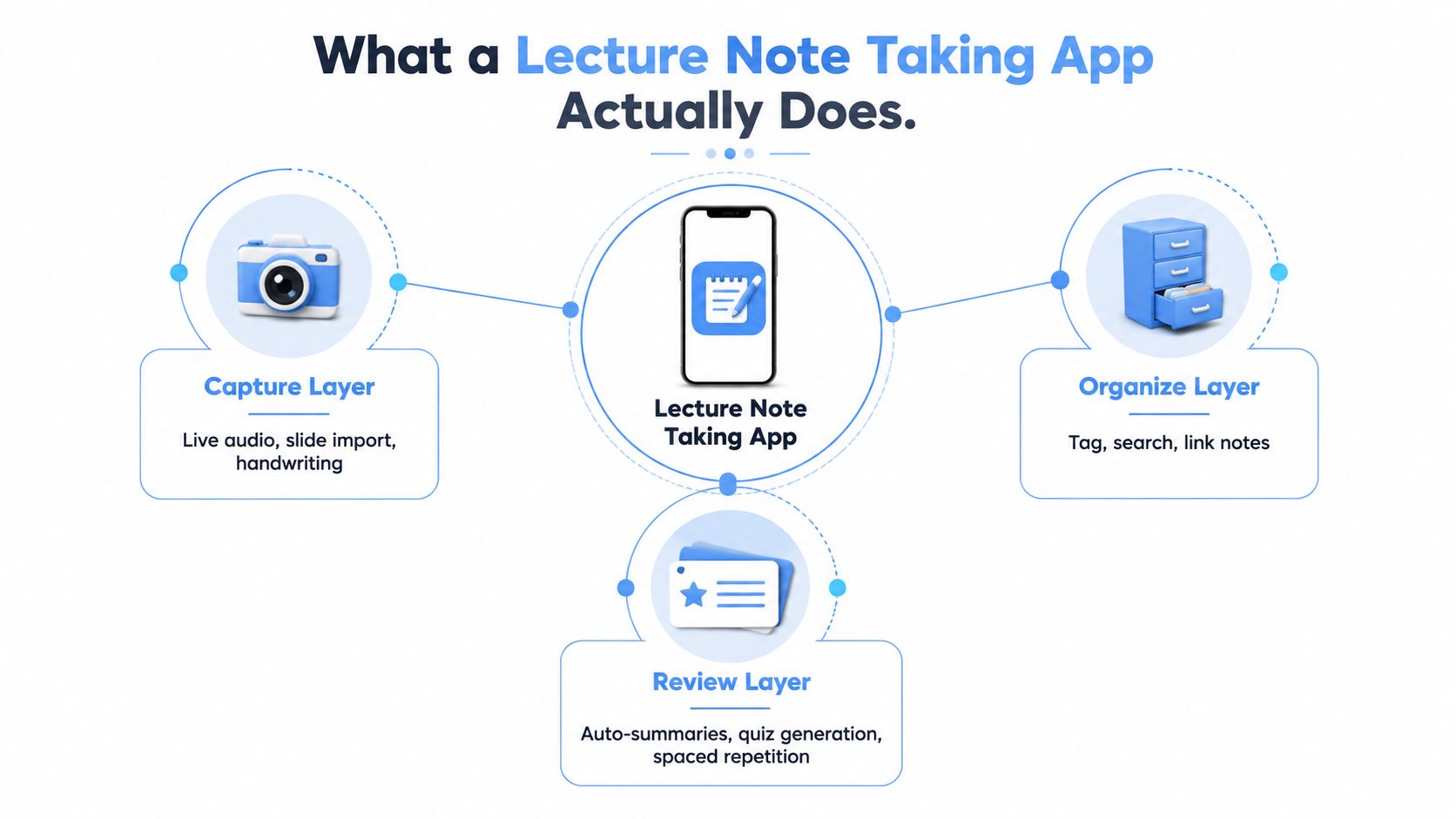
Capture, organize, review
The first job is capture. That can mean live transcription, audio recording, slide import, or a mix of all three, but the point stays the same. The app has to catch the lecture while it is happening. Tools in this category increasingly pair live transcription with clickable timestamps and speaker labels, which shows how the category has moved beyond raw recording toward text students can use later (ScreenApp).
The second job is organization. Notes need structure, because a wall of text is almost as hard to use as a missed lecture. University assistive technology guidance frames note-taking apps as tools that organize classes and lecture notes, which matches the real student need. It is not just storing words, it is making them retrievable later (University of South Carolina).
The third job is review. A good app should make it easy to jump back to a specific point, revisit a definition, or turn lecture material into study prompts. Timestamped playback and searchable text matter because they shorten the path from class notes to study time.
Practical rule: if a tool cannot help you find the exact part you need after class, it is not solving the core problem.
The best way to think about the category is simple. A lecture note taking app is not a fancy recorder. It is a system for reducing cognitive load during class so you can pay attention to meaning instead of trying to capture every word by hand. Browser-based tools like Claras extend that same workflow beyond live lectures, so you can work from YouTube videos, recorded seminars, and shared course material without starting over each time.
The Core Layers Every Lecture Note Taking App Should Cover
A useful lecture note taking app behaves like three tools stitched together: a camera, a filing cabinet, and a study tutor. If one layer is weak, the whole setup feels broken. If all three work together, the app fits the way students move from lecture to revision.
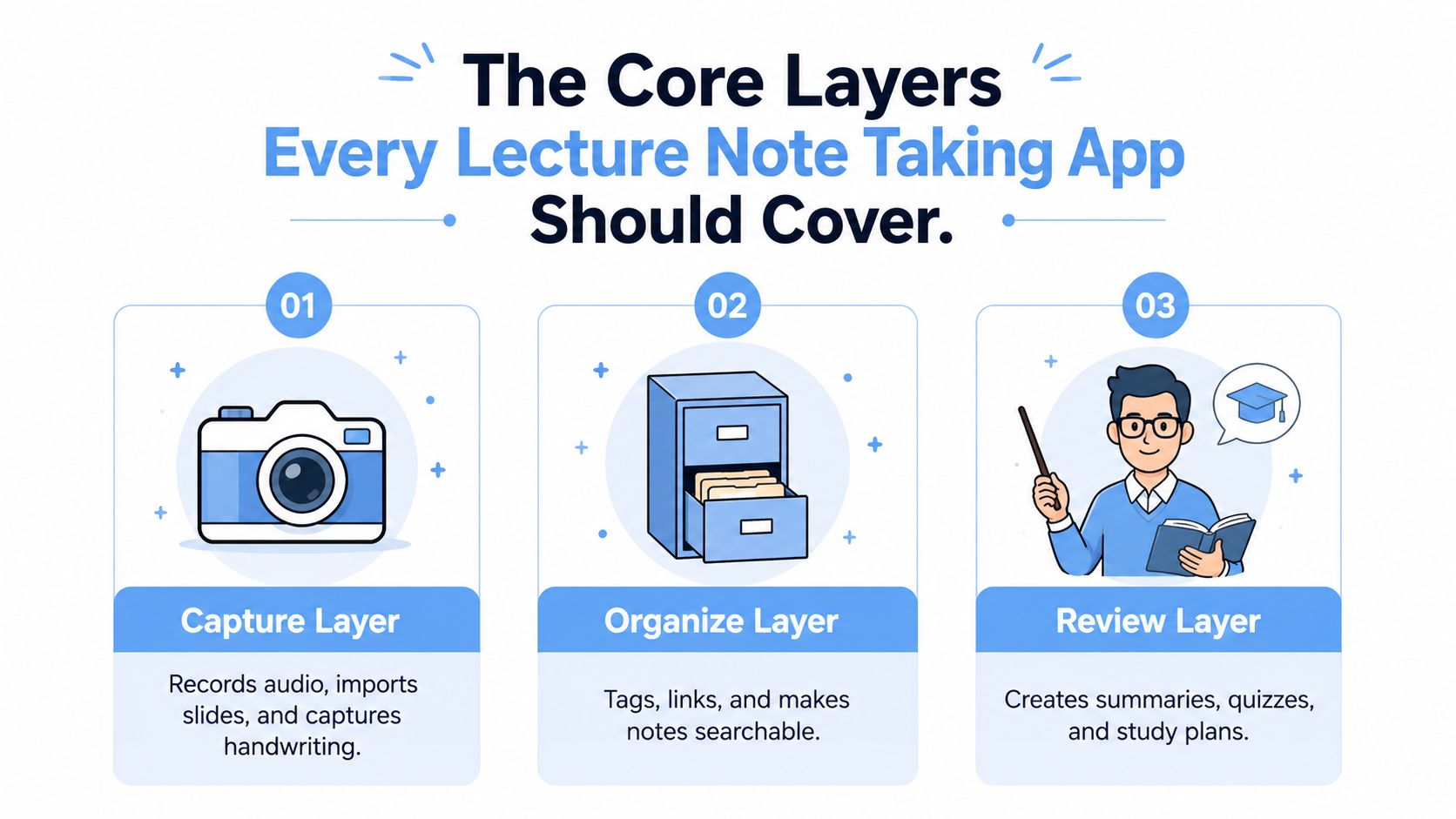
Capture layer first
The capture layer is where the app earns trust. It should handle live speech-to-text, audio recording, and, when possible, slide import or multimedia attachment. University guidance also says note-taking apps should let you play back key parts of lectures and add files and multimedia, which makes sense because students rarely study from audio alone.
Organization layer second
The organization layer turns a transcript into something you can use. Search, tags, folders, and timestamps matter because a lecture is not a document you read top to bottom once. It is a reference you return to at odd moments, like when a quiz question hinges on one definition or one worked example.
Review layer last
The review layer is where many apps become more than transcription tools. Summaries, highlights, flashcards, and exports help you convert class content into revision material. Not every app needs every feature, but the app should support study after the lecture ends.
| Layer | What it should do | Why it matters |
|---|---|---|
| Capture | Record speech, slides, and audio clearly | Without this, there is nothing usable later |
| Organize | Search, tag, and timestamp lecture content | Without this, review becomes slow and frustrating |
| Review | Summarize, export, and support practice | Without this, notes stay passive |
A strong tool gets the order right. Capture comes first, organization makes the content navigable, and review turns the output into something you can study from without rereading everything.
Key Features to Prioritize When Comparing Apps
The easiest mistake is getting distracted by slick menus and AI-powered labels. What matters in class is whether the app helps you capture the lecture cleanly, find the right point later, and turn notes into something you can study without starting over. Everything else is secondary unless your course setup really depends on it.
Must-have features
The essentials are accurate transcription, speaker labeling, timestamping, search, and export. Timestamping matters because it lets you jump back to the exact moment a point was made instead of scrubbing through an entire lecture.
Nice-to-have features
Some features help, but they should not be the first thing you chase. Automatic chaptering, AI chat over the transcript, and slide import improve navigation and context, especially when a lecture is long or dense. They matter most once the core transcript is already solid, because a neat wrapper does not fix bad capture.
Skip unless promised
Other features sound impressive but rarely change day-to-day study. Collaboration rooms, built-in flashcard decks, and bring-your-own-model hooks fit specific workflows, but they are seldom the reason to choose a classroom note app. If the basics are weak, those extras will not rescue the experience.
| Tier | Feature | Why it matters |
|---|---|---|
| Must-have | Speech-to-text | Captures the lecture in usable form |
| Must-have | Speaker labels | Separates instructor, student, and discussion voices |
| Must-have | Timestamping | Lets you jump to the exact moment you need |
| Nice-to-have | Automatic chapters | Makes long lectures easier to skim |
| Nice-to-have | AI transcript chat | Helps with quick clarification |
| Skip unless promised | Built-in flashcard decks | Only useful if you will actually use them |
| Skip unless promised | Collaboration rooms | Rarely the deciding factor for solo study |
Side-by-side comparisons often make the trade-offs easier to see, including this Claras versus Otter.ai comparison. The question is never what looks advanced. It is what helps you reopen the right part of the lecture the night before the exam.
Useful filter: if a feature does not make retrieval, revision, or organization easier, treat it as optional.
Workflows That Turn an App Into a Study System
A transcript by itself is just raw material. The workflow around it decides whether the app becomes part of your study habits or another icon you forget to open. That is why browser-based tools matter, especially for students who no longer only learn from live classes.
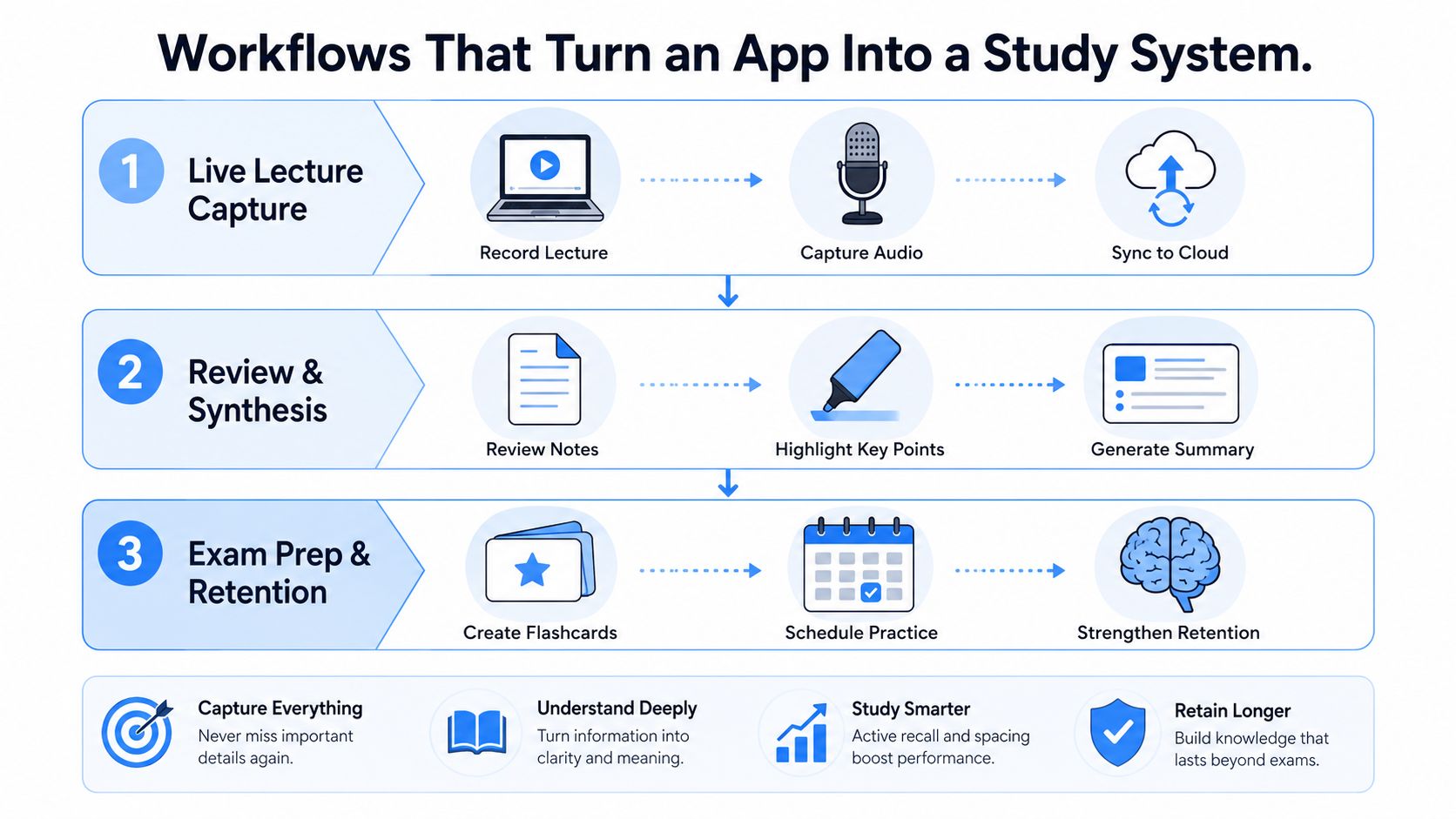
Live lecture capture
In a live class, the cleanest setup is often a laptop running the app beside your notes. You let the app capture the lecture, keep one eye on the slide deck, and tag moments that feel important while the class is still fresh.
Browser-based study from video
A browser-based tool such as Claras fits a different but increasingly common student workflow, where the lecture arrives as a YouTube video, a recorded seminar, or a podcast episode. Claras works in the browser and structures long videos into searchable transcripts, summaries, and timestamped chapters, which helps when the source is not a live classroom recording. Many courses now distribute learning through links and recordings, not just in-person sessions.
Post-class synthesis
After class, the app should help you do the actual studying. That means pulling a short summary, identifying the key definitions, and turning weak spots into practice questions. A transcript that stays passive is only half a tool. A transcript that becomes a review packet gives you a path back into the material.
A good study system does not start with perfect capture. It starts with what you can do with the capture afterward.
The point of the workflow is continuity. One tool should help you move from class, to review, to exam prep without making you copy the same material into three different apps.
Accessibility, Privacy, and Compatibility Checklist
A lot of app reviews ignore the conditions that break a setup. The app can look polished and still fail if it does not work offline, will not run on the device you already own, or creates policy headaches in a classroom that records nothing without consent.
Accessibility first
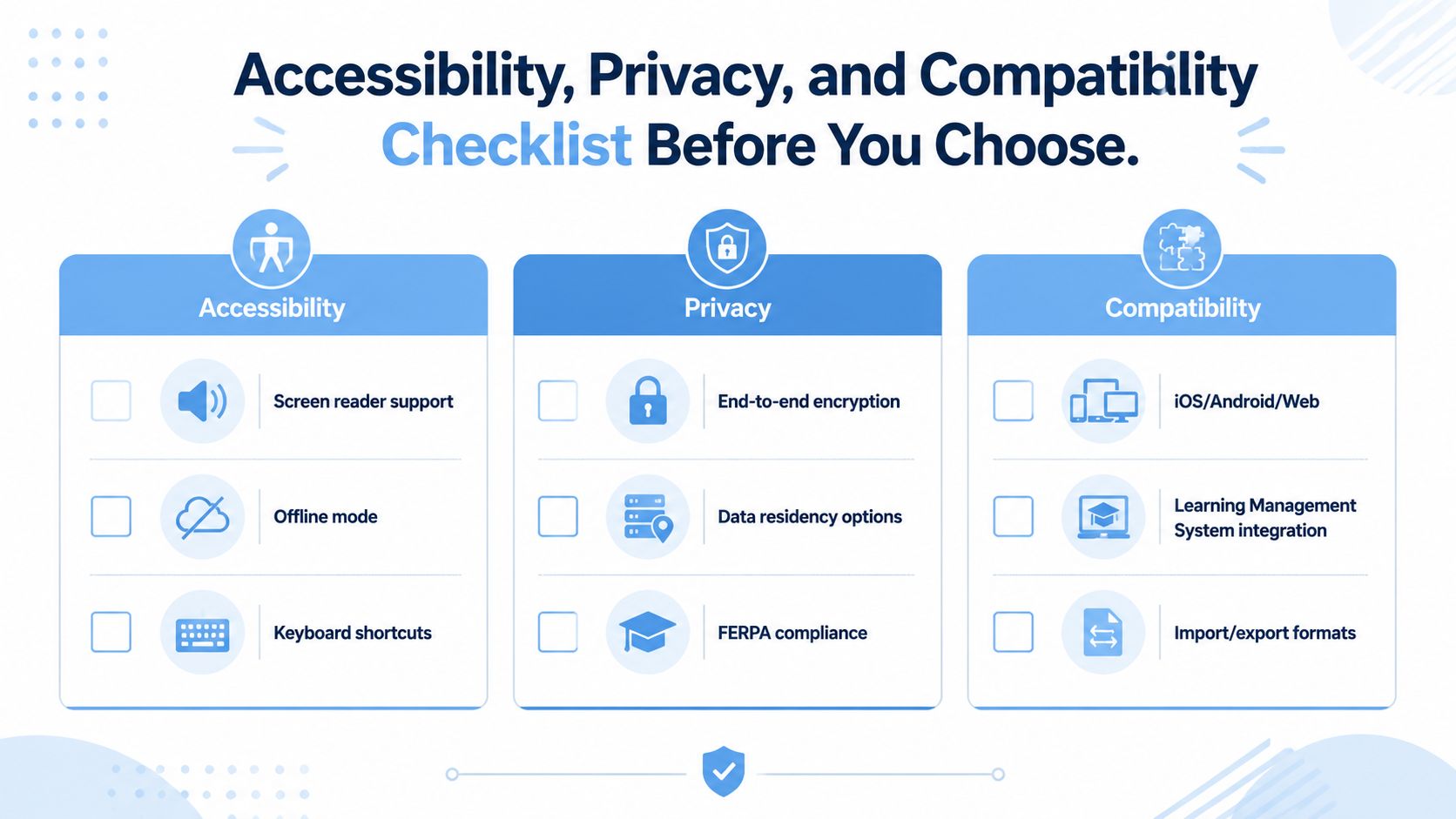
University accessibility resources frame note-taking software as a support tool, not just a convenience. Ask whether the app is usable with a screen reader, whether it offers keyboard shortcuts, and whether it supports offline work if your lecture hall has weak connectivity. The institutional goal is straightforward: students should be able to organize classes and lecture notes and play back key parts of lectures without fighting the interface.
Privacy and policy
Recorded classroom audio can involve sensitive material, so consent and policy matter. If your institution has recording rules, the app has to fit those rules rather than work around them. In the US, ask whether the vendor handles student data in line with FERPA, where recordings are stored, and whether you can delete them. Privacy problems often show up when files move between people, not when they are first recorded.
Compatibility and handoff
Your app should work on the device you already use, whether that is a laptop, tablet, or phone. It should also play nicely with your learning setup, including export formats and any class platform you rely on. If you cannot move notes out cleanly, the app is trapping your work instead of supporting it.
- Accessibility: screen reader support, offline mode, and keyboard shortcuts
- Privacy: how recordings are stored, shared, and deleted
- Compatibility: device support, import and export options, and classroom policy fit
For policy-sensitive users, the Claras privacy policy is the kind of document worth reading before you commit to any note workflow. The rule is simple. If the app cannot survive weak connectivity, consent constraints, and device mismatch, it is not ready for real classrooms.
From Transcript to Learning: Why More Text Is Not Always Better
A full transcript feels reassuring because it looks complete. That feeling can be misleading. It is easy to confuse volume with understanding, and a long transcript becomes a crutch if it replaces active review instead of supporting it.
How to use the text without getting buried
The better habit is to start with the summary, then move into the transcript only where the summary flags something important or where your own notes feel thin. Review the summary soon after class, and convert the transcript into flashcards or quiz questions rather than rereading it passively. That fits the logic of learning, because recall does more work than recognition.
Short rule: if you can explain the idea without looking at the transcript, you have learned it. If you can only recognize it when you see it, you have not.
A simple study framework
- Read the summary first. This gives you the structure before the details.
- Jump to the timestamps. Use the exact lecture moments where confusion started.
- Turn shaky points into questions. Write the prompt in your own words, then answer it without looking.
- Review again later. That spacing matters more than rereading the whole transcript.
The educational value of note-taking software comes from this post-lecture conversion, not from the transcript itself. If you want a practical guide to turning long videos into usable study material, the workflow in how to summarize a YouTube video follows the same idea. Notes should help you think, not just store more words.
Getting Started and Frequently Asked Questions
The easiest way to pick the right setup is to test it in one real course, not in a demo. Use the app for one lecture, mark three moments that mattered, export a one-page summary, and write five active recall questions from the material. If the app helps you do that without friction, you have a workable system.
A first-week setup plan
- Day 1: pick one lecture and record or transcribe it
- Day 2: tag three points that felt important or confusing
- Day 3: export the notes and read the summary before the transcript
- Day 4: make a few questions from the weak spots
- Day 5: review the timestamped sections you flagged
- Day 6: test the workflow on a video lecture or webinar
- Day 7: decide whether the app saves time
Frequently asked questions
Does a lecture note taking app replace note-taking entirely?
No. It works best as a capture and retrieval layer. You still need to choose what matters and turn it into study material.
What about privacy for recorded classes?
That depends on the app and the institution. Check consent rules, storage behavior, and sharing controls before recording anything sensitive.
Do these tools work offline?
Some do better than others, which is why offline support belongs on your checklist. If your classroom connection is unreliable, treat it as a dealbreaker question.
How hard is it to switch tools later?
Switching is easier if the app supports clean exports. If your notes are stuck in one format, moving becomes a manual project instead of a simple change.
Can I use one for YouTube lectures instead of live classes?
Yes, and that is often where browser-based tools are strongest. Claras runs on the YouTube page itself and gives you a transcript, an AI summary with chapters, and a chat over the full transcript, in 17 languages.
Claras offers browser-based transcripts, summaries, timestamped chapters, and AI-assisted answers over full transcripts, so it fits the study workflow described here. If you want to evaluate a tool that handles recorded lectures, YouTube videos, and other long-form learning material in one browser-based flow, add Claras to Chrome and see whether it matches the way you study.
