
You can learn product topics from YouTube without watching every hour of it. Choose one channel for your core craft and one for your current problem, get a transcript, summary and chapters for each long video, write down one thing to test, and review weekly. Claras gives you the first half of that loop on the YouTube page itself, so your time goes to the thinking and the testing.
TL;DR
- Pick two channels, not twenty: one for the core product job, one for what you are working on now.
- Turn each long video into a transcript, summary and clickable chapters, then watch only the parts that matter to your problem.
- Check claims before you act: find who is speaking, jump to the timestamp, and confirm numbers at the source.
- After every video, write one claim in your own words and one small experiment. Review weekly.
- Claras does the transcript, summary, chapters and chat in your browser, with a free plan to start.
Table of Contents
- Why YouTube works for product learning, and where it costs you
- Step 1: Choose channels by job, not by popularity
- Step 2: Get the key ideas out of a long video
- Step 3: Check the claim before you build on it
- Step 4: Capture one idea in your own words
- Step 5: Turn what you watched into practice
- A weekly routine that fits a busy schedule
- Where Claras fits
- Perspective
- FAQ
- Sources
Why YouTube works for product learning, and where it costs you
Product work is learned from practitioners: how a team prioritized, how someone ran a discovery interview, how a founder thought about pricing. Much of that lives in hour-long interviews, conference talks and podcasts on YouTube. It is free and current, and the people on screen are often the people who did the work.
The cost is time and retention. A two-hour interview may hold ten minutes that apply to your roadmap this month. Without a system, you watch at 1.5x speed, feel productive, and remember little.
Assaph Mehr, a product leader, frames PM learning as being T-shaped: deep in the craft of product management, with broad knowledge of domain, business, technology and regulation. He also applies the Pareto principle: about 20% of the effort can give you 80% of the understanding, often enough to hold an intelligent conversation. That is a useful target for video. You are not trying to absorb every minute. You are trying to find the 20% that matters and put it to work.
Step 1: Choose channels by job, not by popularity
Start with what you need to do, not with a list of the biggest channels. Prem Dharmani suggests choosing learning around an active problem: if your customer interviews produce vague answers, study research technique. If your team cannot agree on priorities, study decision-making and strategy. Then keep a balanced mix of research, strategy and technical material over time.
A simple pairing works well. Builders Camp’s guide advises picking one channel for the core PM job and one for your current focus. It names Lenny’s Podcast as the best all-round PM channel and The Product Compass for short concept explainers, with How I AI for hands-on AI workflows. It suggests beginners start with The Product Compass before moving to Lenny’s Podcast. Its picks were screened for being active, on-subject and not run by a company selling PM courses, which is a good filter to borrow.
If you want more starting points by topic:
| You want to learn | Look for |
|---|---|
| Roadmapping and prioritization | Talks and interviews on roadmaps, saying no, and sequencing work |
| Product strategy and vision | Conference sessions from product leaders and founders |
| Agile and delivery | Short animated or explainer lessons |
| AI product work | Hands-on workflow demos from practitioners |
| Startup and market context | Founder interviews and company case studies |
Pick by the problem in the left column, then pick the creator.
Step 2: Get the key ideas out of a long video
This is where most people lose hours. A long video holds an introduction, tangents, sponsor reads and the three ideas you came for. Reading is faster than watching, and a searchable transcript lets you find a topic the way you would search a document.
Here is the routine we recommend for any product talk or interview:
- Open the transcript and summary first. Skim the summary to see whether the video covers your problem at all. If it does not, you have saved an hour.
- Use chapters to jump. Clickable chapters turn a 90-minute conversation into sections. Go straight to the one on pricing, onboarding or prioritization.
- Ask the video a question. If you are looking for how the guest handled a specific tradeoff, ask directly and get an answer drawn from the full transcript.
- Watch the passage that matters. Now watch the five or ten minutes where the idea is explained, with tone and examples, because the transcript will not show you how someone says it.
- Capture the idea. Copy the passage, note the timestamp, and move on.
Claras does steps 1 to 3 on the YouTube page. It gives you instant transcripts, AI summaries and clickable chapters, and you can chat with a video to get answers grounded in its transcript. It also handles videos without captions, which is common for smaller conference channels and older talks. If you want the details of each method, our guide to summarizing a YouTube video with AI walks through the options, and the page on AI chapters for long videos shows how the chapter view works.
When you are working through a whole series, such as every episode of a strategy playlist, bulk processing saves the most time. The YouTube playlist summarizer runs summaries across a playlist so you can rank episodes before you watch any of them.
Step 3: Check the claim before you build on it
A confident speaker on camera is not the same as a correct one. Tufts University’s library guide on evaluating video says it takes extra work: working out who is responsible for the content, researching the creator’s background and perspective, and verifying statistics against other sources. For product learning, that becomes a short checklist:
- Who is speaking, and from what experience? A founder describing a company they scaled is different from a commentator summarizing other people’s work.
- What do they gain? Sponsored segments, course pitches and affiliate links shape what gets said.
- Can you hear the claim yourself? Jump to the timestamp and listen. Patrick Keane, writing about AI-assisted research, notes that automatic captions can mangle names, numbers and jargon, so confirm any figure by hearing it.
- Does the number exist at the source? If a speaker cites revenue, a conversion benchmark or a price, find the company page, documentation or price list.
This is where clickable chapters and timestamps pay off. Instead of scrubbing through a video to find the sentence, you jump to it, hear it and note the time. If you share or cite it later, the timestamp link generator makes a link that opens the video at that moment.
If you are a student or professor, the YouTube citation generator formats a video reference in APA and MLA.
Step 4: Capture one idea in your own words
Watching without applying is the trap. Builders Camp puts it bluntly: watching without applying is entertainment, not learning. Its advice is to write down one thing you will try that week after each video.
Dharmani’s method makes that concrete. After watching:
- Write the claim in your own words.
- Note the conditions under which it might work.
- Test it with a small experiment.
- Record the idea, the experiment and the result in a decision notebook.
His example: a “shorter onboarding” idea becomes a hypothesis about one required step, measured against the first action that shows a user value. He also recommends a weekly review that connects one useful idea to a decision made at work, and notes that the goal is better judgment, shown through decisions that become clearer over time.
A good note has five parts:
| Field | Example |
|---|---|
| Source and timestamp | Interview title, 41:20 |
| Claim, in your words | Users abandon onboarding when a step feels risky |
| Conditions | Works for self-serve products with a required setup step |
| Experiment | Make the step optional for one cohort |
| What would change my mind | No lift in first-action rate after two weeks |
Claras supports export to common formats and integration with knowledge management platforms, so the summary, transcript excerpt and timestamp can go straight into the notebook you already use. For a fuller study routine, see our practical study system for learning from YouTube.
Step 5: Turn what you watched into practice
There are three ways to put a video to work, and they get stronger as they get more hands-on.
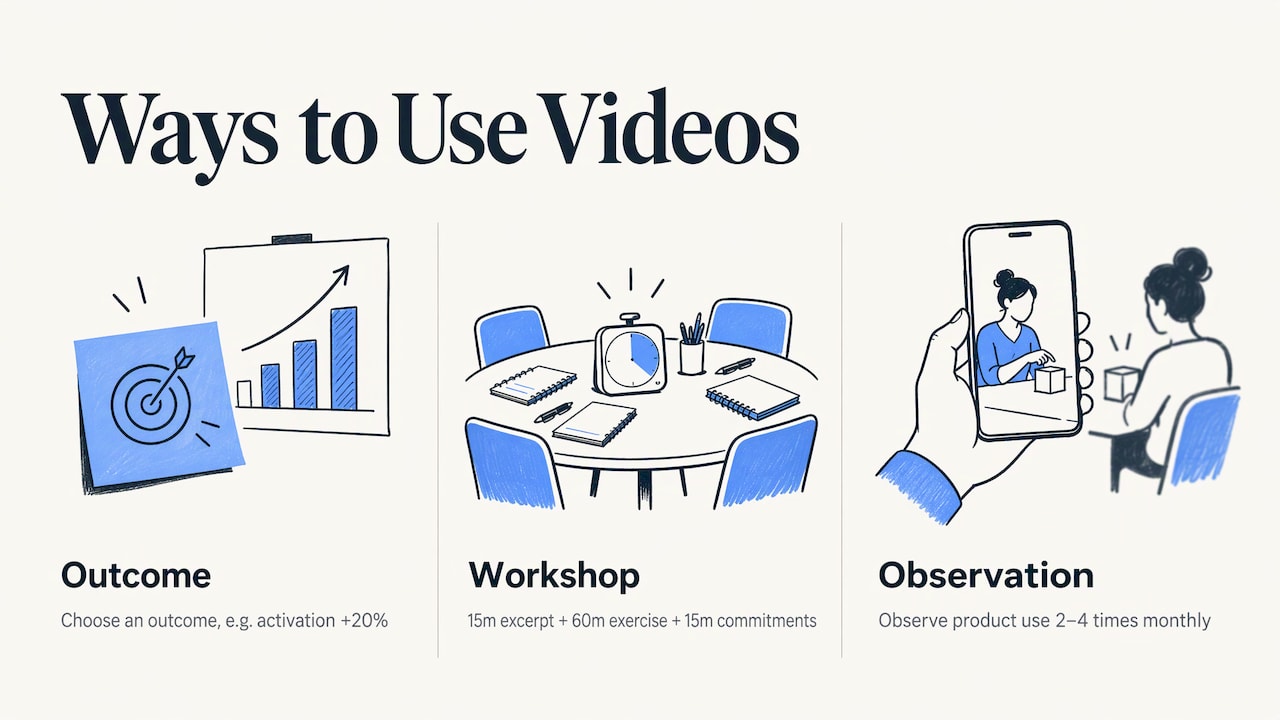
Anchor on an outcome. Ulad Shauchenka suggests choosing one business outcome before you watch, such as improving activation by 20%, and noting which frameworks you will test next week. The video becomes input to a goal instead of a pastime.
Run a mini workshop. The same author recommends turning a talk into a 90-minute team session: a 15-minute excerpt, a 60-minute hands-on exercise and 15 minutes of commitments. A transcript makes the excerpt easy to pick, and chapters let you play exactly the right clip.
Watch people use products. Jules Walter, who led product at Slack, recommends observing people use products two to four times a month and asking open-ended questions such as what they are thinking right now. Videos can feed this too: a recorded usability test or a product teardown gives you more observation than your calendar allows. Walter’s lesson that people leave a flow as soon as they feel confused is easy to spot once you start looking for it.
For professors, the same logic applies to lecture prep: scan transcripts of candidate videos for the passages that fit your learning goals, then clip only those. Content creators and people repurposing video can use the same material for writing; our YouTube video to blog post workflow shows how.
A weekly routine that fits a busy schedule
You do not need a new hour each day. Here is a pattern that fits around a job:
- Monday (10 minutes): Name the problem you are working on and pick the video that speaks to it.
- Midweek (30 minutes): Run the summary and chapters, watch the relevant segments, and ask the video your specific question.
- Same session (5 minutes): Write the claim, conditions and experiment.
- Friday (15 minutes): Review your notebook and connect one idea to a decision.
About an hour a week, with one idea tested, beats five hours of passive watching. If you are researching a broader topic across many videos, the research workflow for topics with YouTube videos shows how to compare sources side by side.
Where Claras fits
Claras is a browser-based tool and Chrome extension that works on the YouTube page. It gives you transcripts even when a video has no captions, AI summaries with clickable chapters, comment summaries, and chat with the video. It supports over 70 languages, bulk processing for playlists, export to common formats and knowledge platforms, and custom AI models.
The Free plan lets you try it on your next product talk. The Pro plan is $4 per month or $48 per year, and Unlimited is $10 per month or $120 per year. See the pricing page for what each plan includes, or install the YouTube transcript extension for Chrome and open any interview you have been meaning to get to.

If you are also checking what other channels say about your market, the competitor analysis use case applies the same method to what companies say in their own videos.
Perspective
We built Claras around one belief: the hard part of learning from video is not access, it is attention. Product people already know where to find good talks. What they lack is a way to tell in two minutes whether an hour will pay off, and a way to get the useful minutes into their notes.
That is why we put the transcript, summary, chapters and chat directly on the YouTube page. You stay in the place where you already learn, and you leave with something you can use: a quote with a timestamp, a claim to test, a question answered from the full transcript.
We also think the best use of AI here is to give you more time for judgment, not to replace it. Read the summary, hear the claim, test the idea. Done that way, a library of free talks becomes a working education.
the author
FAQ
How many YouTube channels should I follow to learn product management?
Two is enough to start. Take one channel for the core PM job and one for your current focus, as Builders Camp suggests. Add more only when a specific problem needs it.
Can I learn product management from YouTube alone?
It is a strong source of practitioner knowledge, and you can build breadth quickly. Assaph Mehr notes that product management is best learned as an apprenticeship, with corrections from experienced people. Pair your viewing with real tasks at work, such as a pricing or prioritization exercise, and go deep when the task demands it.
How do I get a transcript of a video with no captions?
Claras transcribes YouTube videos even when they have no captions, and you can open the transcript, summary and chapters on the video page through the Chrome extension. You can also use the free subtitle downloader for SRT and TXT files.
How do I remember what I watch?
Write one claim in your own words after every video, add one experiment, and review weekly. Keep the timestamp so you can return to the exact passage. Saving the summary and transcript excerpt to your notes app makes the review faster.
Sources
- How to study Product Management and elevate your PM game (Assaph Mehr)
- Learning from Product Books and Podcasts: A Practical Guide (Prem Dharmani)
- Best product management YouTube channels (Builders Camp)
- Evaluate videos, Evaluating Information (Tufts University Libraries)
- How to Analyze and Research Information Very Quickly from YouTube (Patrick Keane)
- The Top 20 YouTube Videos on Product Management (Ulad Shauchenka)
- How to develop product sense (Jules Walter, Lenny’s Newsletter)
